


HomeLink®
3.233.00 Reviews
App Specs
- Version
- 4.2.0
- Updated On
- License
- Free
- Downloads
- 50,000+
- Developer
- Gentex Corporation
- Categories
- Auto & Vehicles
- Platform
- Android
Screenshots
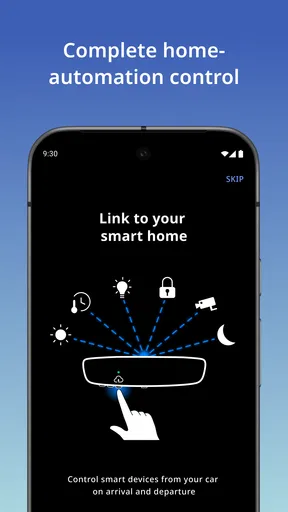
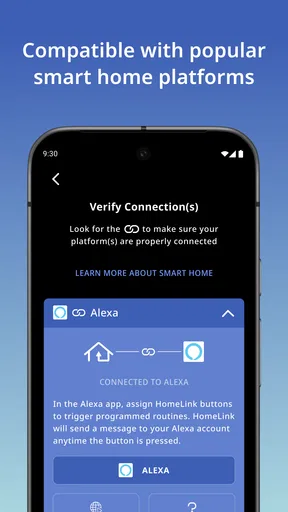
 Analysis by AppCompare
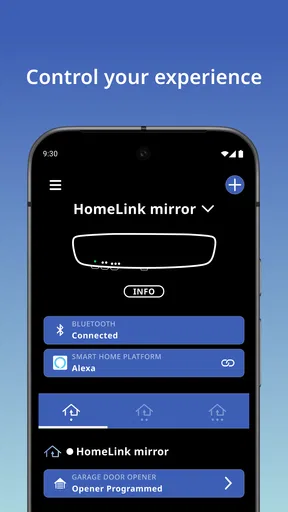
I usually think of in-car controls as something that should disappear into the background: set them up once, then use them without reaching for a phone. That is the idea behind HomeLink®, a free Auto & Vehicles app from Gentex Corporation that brings compatible home-automation controls into the driving experience. Its store summary calls it “In-vehicle home automation,” but in daily use the more useful question is whether it makes arriving home simpler than using a separate remote, a smart-home app, or both.
My impression is that this is a focused companion rather than a complete smart-home hub. It makes the most sense when your vehicle and home equipment already support the HomeLink ecosystem. In that situation, the app can help with setup and management around the car. If your main goal is broad control of lights, cameras, thermostats, locks, and routines from one mobile dashboard, I would look first at a general smart-home platform instead.
What the current app is really for
The current release is version 4.2.0, and the app remains aimed at one practical job: connecting the convenience of vehicle-based controls with home automation. I would not install it expecting a social feed, a large catalog of devices, or a traditional remote-control app that works with every garage door and household product. Its usefulness depends heavily on compatibility and on how your vehicle is equipped.
That narrow focus is also its strongest quality. A driver who regularly opens a garage door, gate, or similar supported system can benefit from having the action associated with the vehicle instead of keeping a handheld remote in a console. The best experience is not about spending time inside the app. It is about completing setup, checking that the connection behaves as expected, and then using the car’s controls with less friction.
The app is listed for users aged Everyone and requires a relatively modern mobile operating system, with minimum OS support set at version 10. That makes it accessible to many current Android or iOS users, though anyone keeping an older phone should check compatibility before planning a vehicle setup around it. The free price is welcome, especially because the real investment is usually in compatible vehicle and home hardware rather than the download itself.
Its public reception is mixed rather than universally enthusiastic. The app has an average rating of 3.2 from around 75 ratings and about 33 written reviews, with more than 50K installs. I read that as a reason to approach installation realistically: there is clear interest, but also enough variation in vehicle, receiver, phone, and home-network combinations that one person’s smooth setup may not match another’s.
Where it fits better than a normal smart-home app
A regular smart-home application is usually designed around the phone. You open it, choose a room, select a device, and wait for the command to travel through the internet or your home network. That is useful when you are already holding the phone, but it is less natural when you are driving up to a property and want a quick, repeatable action.
Worth Reading Before You Choose

EA SPORTS FC Mobile 26 Is a Bigger Football Game, but It Takes Time

Flipboard Shows What News Apps Must Do Beyond the Feed

Switching to Android Auto Means Rethinking Your Driving Routine

Google Calendar Makes a Crowded Week Easier to Manage

Ludo King Makes the Most of the Minutes Between Plans

Baby Panda World Brings Quick Play to Modern Phones, but Its Game Library Feels Busy
HomeLink® is more vehicle-centered. The appeal is strongest for people who want the car to be part of the arrival routine, not merely another screen running the same controls. For example, if I am returning with groceries, I would rather rely on a control placed where I can use it without balancing a phone and searching through a home-automation menu. That convenience is small, but it is repeated often, which makes the setup worthwhile.
The trade-off is breadth. A general smart-home app may offer richer scenes, schedules, device grouping, notifications, and support for products from several manufacturers. This app should be judged as a specialized bridge to the vehicle, not as a replacement for that broader ecosystem. If you rarely drive, park away from home, or already have a dependable voice assistant routine, its advantage becomes much smaller.
Setting expectations before you install
The most important preparation is to identify the exact equipment involved. “Home automation” can sound broad, but the useful result depends on whether your vehicle, opener, gate system, or other supported control is compatible with the HomeLink setup. I would check the vehicle manual and the hardware documentation first, then install the app rather than assuming the phone alone can add the feature.
This also answers a common practical concern: downloading the app does not automatically turn any car into a HomeLink-equipped vehicle. The app is part of a larger arrangement involving the vehicle and the home-control hardware. If your car lacks the relevant controls or your receiver uses an unsupported method, the app may not solve that gap.
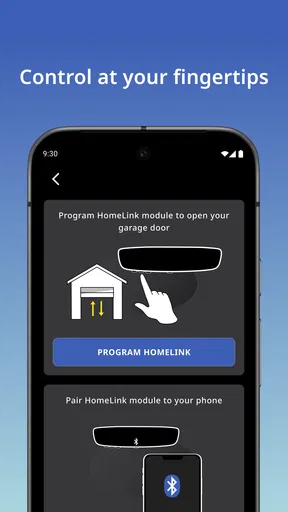
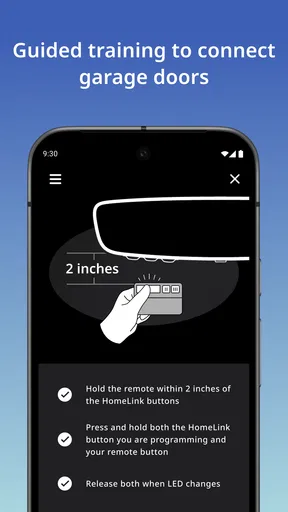
During setup, I would keep the vehicle parked safely and have the original remote or device instructions nearby. Pairing home equipment often requires a sequence of button presses, learning modes, or proximity between the remote and the vehicle. Rushing through those steps while parked on a driveway is an easy way to mistake a setup problem for an app failure.
How the experience holds up in everyday use
My preferred test for an app like this is not a dramatic demonstration. It is a normal evening: I am approaching home, the weather is poor, one hand is occupied, and I want the entrance ready without digging through a phone. In that scenario, the value comes from predictability. A control system that works consistently but does very little can be more useful than a feature-rich app that requires several taps and a strong connection at exactly the wrong moment.
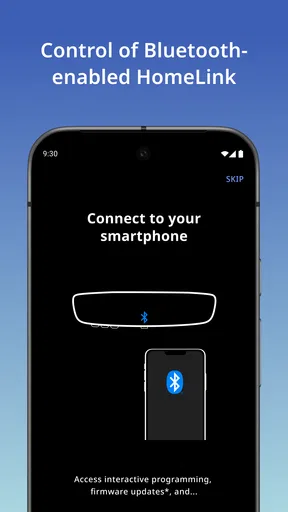
That is where HomeLink® can feel sensible. Once the vehicle-side arrangement is established, the interaction is intended to be part of driving rather than a separate smartphone session. The app’s role is most important before and around that moment: helping organize the connection, guiding configuration, and giving the user a place to manage the relevant setup.
A less obvious benefit is the reduction of duplicate routines. Many drivers keep a physical remote, a phone app, and perhaps a voice command available because they do not fully trust one method. A vehicle-based setup can simplify the routine, but I would still keep a backup during the first few days. Testing at different times and from the normal approach to the property is more informative than trying it once while standing next to the opener.
Another useful workflow is to treat the app as a configuration tool rather than something to open every time. If you continually need to launch the phone app to perform the same action, the vehicle integration is not delivering its main advantage. I would spend the time to understand which control in the car activates the programmed function, label or remember each button clearly, and then leave the smartphone for troubleshooting or changes.
What version 4.2.0 tells existing users
The current version is 4.2.0, while the app’s release date is January 7, 2019. That combination tells me the product has had time to evolve beyond its first release, but it does not by itself promise a particular new feature or a universal improvement for every vehicle. I would separate the confirmed present state from expectations: the version number is current information, whereas assumptions about a major redesign, expanded compatibility, or a different setup flow would be speculation.
For an existing user, the sensible approach is practical rather than dramatic. Update when the version is available for your device, then check whether your current vehicle connection still behaves normally. If the app has been stable for you, there is no reason to rebuild the entire setup simply because the version changed. Reconfiguration should be a response to an actual problem, a vehicle change, or a new compatible home device.
Before updating, I would make a note of which vehicle control operates which entrance and keep the original remote accessible. That small precaution matters because a convenience system becomes frustrating when a user forgets the old fallback during troubleshooting. It also makes it easier to distinguish an app issue from a receiver, vehicle, or remote-control issue.
New users should not interpret the current version as proof that every older vehicle receives identical behavior. Vehicle integration can vary by model and equipment, so the app experience is only one part of the result. This is an important limitation for buyers comparing cars: I would verify the actual vehicle’s HomeLink implementation instead of relying on the phone app’s existence.
Small details that make setup less painful
One of my strongest recommendations is to test from the place where you will genuinely use the control. A system may respond when the car is close to the garage but behave differently at the end of a driveway, behind a gate, or near another structure. That test reveals whether the arrangement is convenient in real life, not merely technically paired.
I would also avoid changing several variables at once. If you replace the phone, update the app, change the opener, and move the vehicle during the same setup session, it becomes difficult to identify the cause of a failure. Establish one working baseline first, then make changes individually. This is especially helpful for households where more than one person uses the same entrance.
For multiple entrances, write down a simple mapping before programming: vehicle control one for the garage, control two for the gate, and so on. The app may help with the management side, but memory is still part of the user experience. Clear mapping prevents the annoying mistake of activating the wrong entrance when arriving late or in poor visibility.
Finally, do not treat convenience as permission to ignore safety. I would only activate an entrance when the vehicle is positioned appropriately and I can confirm that the path is clear. The faster a control becomes, the easier it is to use automatically, so a deliberate habit matters more than shaving off a tap.
Where the friction remains
The main weakness is dependence on an entire chain of compatible components. If the car, receiver, remote, phone, or setup process does not cooperate, the app cannot single-handedly repair the situation. That makes troubleshooting less straightforward than using a basic physical remote. With a remote, there are fewer layers; with vehicle automation, each layer can introduce a different failure point.
I also see a learning curve for people who expect the app to behave like a conventional mobile control panel. The important action may happen through the vehicle, while the phone is involved in setup or management. That separation can feel confusing at first, particularly if someone installs the app without reading the vehicle instructions.
There is also a trade-off between convenience and visibility. A physical remote gives immediate tactile feedback, while a phone app may show a clearer interface but demands attention. Vehicle controls can be quick, yet users need to know whether the command was accepted and whether the entrance is actually moving. I would not rely on a button press alone when visibility is limited.
The mixed rating reinforces my cautious view, but it does not prove that the app is poor for every setup. A specialized integration can be excellent in one vehicle and disappointing in another because the surrounding hardware is different. I would therefore judge it after confirming compatibility, not by treating the average score as a universal verdict.
Who should use it, and who should skip it
I think this app is a good match for a driver whose vehicle supports HomeLink and who regularly uses a compatible garage, gate, or home-control system. It is especially appealing if the current alternative is keeping a remote in the car, opening a phone app while arriving, or maintaining several disconnected routines. The free cost lowers the barrier to trying it, provided the hardware is already suitable.
It is less compelling for someone who rents a place without permission to alter the opener, lives in a building with shared access, or rarely approaches a controllable entrance by car. I would also skip it if your home is built around another ecosystem and your main needs involve lights, climate, cameras, or security scenes rather than vehicle access.
A general smart-home platform is the better option when you want one app for many brands and device types. A physical remote is better when maximum simplicity, independence from phone setup, and easy replacement matter most. HomeLink® occupies the middle ground: more integrated than carrying a remote, but narrower than a full smart-home dashboard.
What I would watch as the product continues
For future updates, I would pay attention to improvements that reduce setup ambiguity and make compatibility easier to understand. Those changes would matter more to me than decorative interface adjustments because the hardest part of this category is getting the vehicle, receiver, and app to agree.
I would also watch how well the current release serves existing users after phone and vehicle changes. A mature companion app should make transitions understandable, preserve confidence in established configurations, and help users identify whether a problem comes from the app or from the connected hardware. Those are expectations, not claims about features already present.
My final view is positive but deliberately narrow. HomeLink® is not a universal answer to home automation, and it should not be sold to yourself as one. It is a focused tool for making compatible vehicle-to-home controls more convenient. When that is exactly the problem you want to solve, the free app from Gentex Corporation is worth trying, and its best feature is the way it can fade into a simple arrival habit. When you need broad smart-home control or have uncertain hardware compatibility, a general platform or a dependable physical remote will probably serve you better.
Pros
- Remotely unlock doors for approved guests without sharing physical keys.
- Real-time activity alerts help monitor access to your property.
- Supports multiple properties and devices from one account.
- Temporary access permissions can be useful for visitors or service providers.
- Clean interface makes common lock controls easy to find.
Cons
- Requires compatible HomeLink® hardware and an active connected service.
- Remote controls depend on internet
- Bluetooth
- or cellular connectivity.
- Some features may vary by vehicle
- lock
- region
- or subscription plan.
- Account setup and device pairing can take time for first-time users.
- Access management requires careful permission settings to avoid mistakes.
FAQs for HomeLink®
What is HomeLink® and what can I use it for?
HomeLink® is a connected-home platform designed to help users interact with compatible smart-home features, such as garage doors, gates, lights, or other integrated vehicle and home systems. Its exact capabilities depend on the supported hardware and manufacturer. Before downloading, check whether your vehicle, garage opener, or connected device is officially compatible with HomeLink®.
Does HomeLink® work with every garage door opener or smart-home device?
No. HomeLink® is not universally compatible with every opener, gate system, or smart-home product. Compatibility can depend on the device model, radio frequency, security technology, region, and whether an additional bridge or compatibility accessory is required. Review the official compatibility information and confirm your equipment before relying on the app or connected feature.
Do I need additional hardware to use HomeLink®?
In some situations, yes. HomeLink® may work directly with compatible equipment, while other installations require a compatible vehicle system, a dedicated bridge, a remote-control learning process, or an extra smart-home hub. The app itself cannot replace unsupported hardware. Check the setup requirements for your specific garage door, gate, vehicle, or home automation system before installing.
Is HomeLink® free to download and use?
The availability and cost of HomeLink® features can vary depending on the platform, vehicle, hardware manufacturer, and connected services involved. Downloading an associated app may be free, but certain functions could require compatible equipment, a subscription, an account, or professional installation. Review the current store listing and service terms to understand any charges before completing setup.
Is HomeLink® secure, and what should I do if the app or connection stops working?
HomeLink® is intended to provide convenient access to compatible home and vehicle functions, but security also depends on your hardware, account protection, network, and installation. Use strong credentials, keep supported software updated, and avoid sharing access unnecessarily. If connectivity fails, verify power, internet access, Bluetooth or network permissions, device compatibility, and the manufacturer’s troubleshooting instructions.


